
BigCommerce MCP Server: A Complete Guide for AI Integrations
September 28, 2026, 5:30 AM
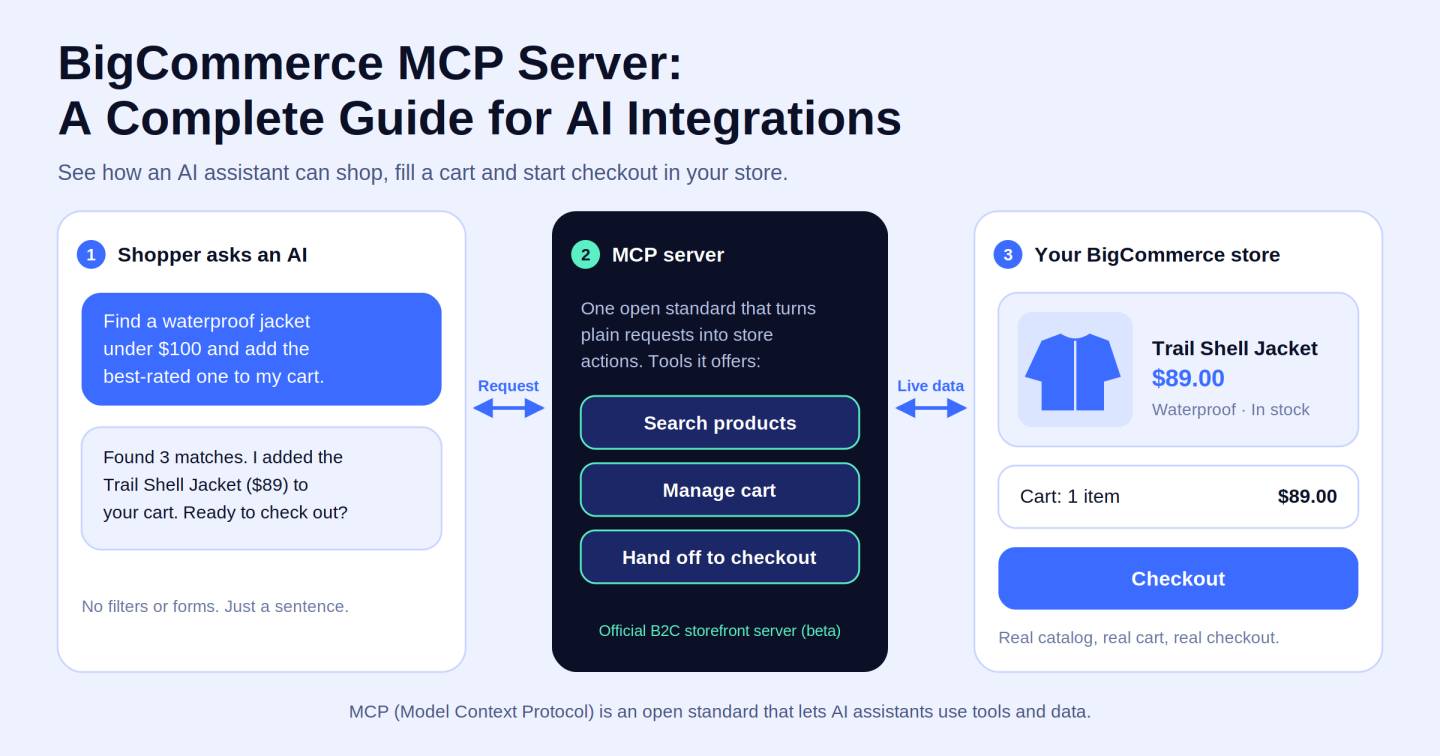
While there are a lot of players in this space, the BigCommerce MCP Server is emerging as one of the most important tools in ecommerce. Most store owners have never even heard of it. Even now, most developers are only beginning to notice. But BigCommerce AI integrations developed with the BigCommerce Model Context Protocol are already changing how shoppers identify products, build carts and complete transactions. In this guide, we will talk about What It Is, How It Works, How to Set It Up, Real Life Use Cases and… the one aspect that no else is talking about yet in ecommerce.
What Is the BigCommerce MCP Server?
Start here, because the terminology makes this sound harder than it actually is.
MCP (MODEL CONTEXT PROTOCOL) was developed by Anthropic as an open source standard allowing AI applications to interface with external tools and data reliably and consistently. The most basic analogy is a global plug. MCP provides a universal language to all tools instead of wiring every AI tool with every possible outside system.
The BigCommerce MCP Server is a customized derivative of that standard, built specifically to allow AI agents to communicate directly with your BigCommerce storefront. An AI can explore your live product catalog, show product details, edit carts and create checkout links - all in real-time, inside a natural dialogue.
Now here is the part that changes how you think about all of this.
People use the words chatbot and AI agent like they mean the same thing. They absolutely do not. A chatbot responds. An AI agent acts. For example, a user might ask a chatbot whether the blue sneakers are available in size 10. An AI agent, linked through the MCP server for ecommerce can search your current catalog, validate stock, cart the item and give the shopper a functional checkout link - all in one conversation - with nobody clicking through a single page of your storefront.
That difference, responding versus acting, is the whole game. The BigCommerce MCP Server is what makes acting possible.
How BigCommerce MCP Server Works
BigCommerce MCP Architecture
The system runs on four connected layers, and once you see how they fit together, everything becomes clear.
The AI application or agent is the surface your shopper or team member actually talks to. Claude, a custom GPT, or any AI tool that supports MCP clients.
The MCP client lives inside the AI application and handles the structured communication. It sends properly formatted requests and knows how to read what comes back.
The BigCommerce MCP Server sits in the middle and does the translation work. It takes requests from the MCP client, converts them into commands BigCommerce understands, and returns clean structured data back to the agent.
The BigCommerce storefront and commerce engine is where the real data lives. Your product catalog, cart system, checkout flow, and order information all sit here, and the MCP layer reaches into them on demand.
How an AI Shopping Request Works
Here is the whole flow, no jargon involved:
User request → AI agent reads the intent → MCP tool selected → BigCommerce queried → Result returned → AI responds with products, prices, and a cart link
A shopper says "running shoes under eighty dollars in size nine." The agent understands what that means, reaches into your live catalog through the BigCommerce MCP layer, and comes back with relevant options and a ready-to-use cart link. The entire exchange takes seconds. No browser tab opening. No search bar to wrestle with. No moment where the shopper loses the thread of what they were looking for.
How to Set Up and Connect BigCommerce MCP Server
#1. Prerequisites
Sort these out before touching any settings, because skipping them turns a simple setup into an unnecessary headache.
An active BigCommerce storefront with a complete and accurate product catalog. The integration pulls live data, so if your listings have gaps, what the AI can surface will have gaps too.
Admin access to the BigCommerce Control Panel. You will need it to locate integration settings and generate the credentials that authentication requires.
A compatible MCP client. Claude Code, Claude Desktop, Cursor, and Codex all support the MCP standard. Each has a slightly different configuration path, but none of them are complicated once you know what you are looking at.
Node.js installed on your machine if you are using Claude Desktop specifically. The other clients have more direct setup paths that skip this requirement entirely.
#2. Enable BigCommerce MCP
BigCommerce provides a dedicated MCP server endpoint at https://docs.bigcommerce.com/_mcp/server. This is the address you will reference when configuring any compatible AI client.
Open your BigCommerce Control Panel, go to developer tools or early access settings, and enable the MCP integration. Note your store-specific endpoint and any authentication details you will need for the next step.
For integrations that go deeper than documentation access, covering real product management, customer data, and order handling, platforms like Zapier MCP, viaSocket, StackOne, and CData all offer BigCommerce MCP integration paths built specifically for that level of connection.
#3. Connect an AI Client
Claude Code is the most direct path. Open your terminal inside any project and run:
claude mcp add --transport http bigcommerce-docs https://docs.bigcommerce.com/_mcp/server
Add --scope user to the command if you want this connection available across every project on your machine, not just the current one.
Cursor requires a small edit to a configuration file. Go to Settings, then Tools and MCPs, and add a new MCP server. You will edit your .cursor/mcp.json file directly and add the bigcommerce-docs server entry with the MCP URL. Cursor picks up the change automatically when you save.
Claude Desktop has a few more steps. Go to Settings, then Developer, then Edit Config. This opens claude_desktop_config.json in your file system. Inside the mcpServers section, add the BigCommerce server configured to use npx mcp-remote pointing to the MCP URL. After saving, fully quit and reopen Claude Desktop. Closing the window is not enough. The app needs a complete restart to register the new server.
Codex works entirely from the terminal. Run codex mcp add bigcommerce-docs --url https://docs.bigcommerce.com/_mcp/server and then confirm it registered correctly with codex mcp list.
Test the Integration
Once connected, test properly before relying on this for anything that matters.
Ask your AI tool what MCP tools it has available. A working connection will surface tools from the BigCommerce server in the response. Then work through each capability in order. Search a product by name. Pull its details including price and availability. Add it to a cart. Generate a checkout link and open it to confirm it loads the correct cart on your live storefront. If something breaks, check the server URL first, then Node.js setup for Claude Desktop, then store credentials. Most failures come back to one of those three things.
BigCommerce Use Cases for AI-Powered Ecommerce
AI Shopping Assistants
The most immediate use case is a conversational shopping assistant powered by your live store data. A customer describes what they want in plain language. The agent searches your catalog and returns relevant results. No navigation menus, no filter panels, no abandoned search sessions. Just a shopper saying what they need and getting useful options back in seconds.
Conversational Product Discovery
Standard keyword search has always been hard on vague shoppers. They need the right term, the right spelling, the right category. Conversational discovery through AI ecommerce agents removes that barrier entirely. "Something for a beach vacation, under fifty dollars, in a bright color" is enough to work with. The agent reads the intent and searches accordingly. For stores with large or complex catalogs, this is what turns technically available inventory into genuinely discoverable inventory.
AI Cart Building
Good upselling has always required the right timing and the right context. An AI agent running on BigCommerce agentic commerce can build full carts through natural conversation. A shopper describes a need, the agent recommends products that make sense together, explains the thinking, and adds everything in a single action. The path to purchase gets shorter without the experience ever feeling like a hard sell.
Agentic Commerce
This is the angle almost nobody covering the BigCommerce MCP Server is talking about, and it is genuinely the most important one.
The real opportunity here is not a smarter search widget sitting on your existing storefront. It is the emergence of agentic commerce, where AI agents take autonomous, multi-step actions on a shopper's behalf. Discovery, comparison, cart building, and checkout can all happen inside a single conversation, inside the AI interfaces your customers are already living in every day.
Your storefront does not disappear. A brand new channel opens alongside it. Commerce can now happen inside Claude, inside ChatGPT, inside whatever AI tool a shopper happens to be using, without them ever opening a browser tab pointed at your store. Most brands have no idea this window exists yet. That is the opportunity sitting in plain sight right now.
Customer Support and Product Assistance
Support teams, whether human-assisted or fully AI-powered, get a significant upgrade when they have live storefront access through the BigCommerce MCP Server. Stock levels, specs, pricing, compatibility, all of it available in real time without anyone manually digging through a backend. Customers get accurate answers faster. Support teams stop spending hours on catalog questions that a properly connected AI can handle in seconds.
Frequently Asked Questions (FAQs)
1. What can BigCommerce MCP do?
The BigCommerce MCP Server enables AI agents to search your live product catalog, retrieve detailed product information including pricing and availability, manage cart creation and item additions, and generate checkout links that drop shoppers directly into a pre-built cart.
2. Is BigCommerce MCP different from the BigCommerce API?
Completely different purposes. The BigCommerce REST API is a traditional programmatic interface, backend code talking to your store in a controlled and predictable way. The BigCommerce Model Context Protocol is built for AI-agent connectivity specifically. Agents discover and call available commerce tools at runtime, reading intent and selecting the right action without hardcoded logic.
3. Which AI tools support BigCommerce MCP?
Compatible MCP clients right now include Claude Code, Claude Desktop, Cursor, and Codex. Platforms like Zapier MCP, viaSocket, StackOne, and CData extend this further with BigCommerce MCP integration paths that connect AI agents to live commerce operations beyond documentation.
4. Is BigCommerce MCP suitable for every ecommerce business?
It depends on what you are trying to accomplish. Stores with large or complex catalogs benefit most from conversational discovery. Businesses exploring AI-assisted selling have a clear reason to move on this now. For purely software-to-software operations with no AI agent involved, a direct API connection is simpler and more predictable.
Recognized for Excellence